
GBP Optimization: Boost Local Visibility with GBP.
GBP Optimization
GBP optimization is the process of improving a business’s Google Business Profile (formerly Google My Business) to boost its visibility and ranking in local Google Search and Google Maps results.



Why Optimizing Your Google Business Profile Matters
Visibility is the key to the success of a local business in the modern digital world. And, as you are about to see, one of the most potent tools you can rely on when it comes to local search is your Google Business Profile (GBP). It is not a mere listing, but an online store in front of your business, assisting your potential customers in locating, discovering, and contacting you. Optimizing your GBP boosts your visibility in local search results, Google Maps, and even voice searches. This increases the chances that when customers are choosing between you and your competitors, they’ll choose you.
But what does GBP optimization entail, and how can you do it right? Let's break it down.
Importance of GBP Optimization:
Local visibility: A highly optimized profile will improve your likelihood of appearing in Google Local Pack (first three results including maps).
Customer trust: Full and transient information will help the customers believe that your company is legal and trustworthy.
Competitive advantage: GBP is not well used by many businesses. Optimizing yours puts you a step ahead.
Most Important Steps to Maximize Your GBP.
1.) Create and confirm your profile
The initial goal is to ensure that you own your business. Learning to verify is the best way to manage what customers view and to avoid having your profile edited wrong.
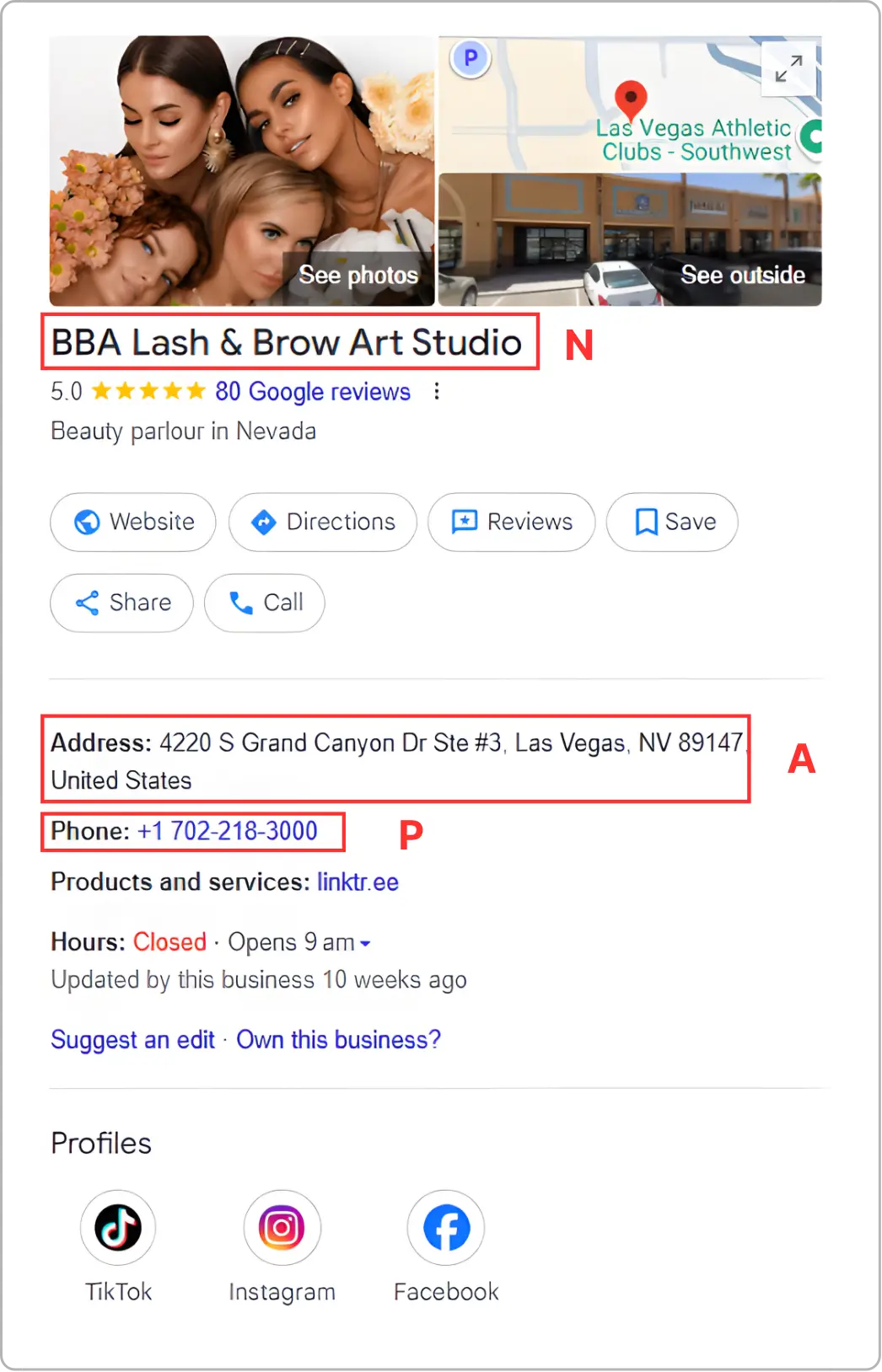
2.) Complete Your Essential Data (NAP)
The Name, Address and Phone Number (NAP) must be accurate and similar across all platforms. This also helps to gain customer trust, and this is an indication to Google that this business is genuine.
3.) Choose the Correct Business Type
Selecting the most applicable primary category and possibly including secondary categories assists Google in knowing what your business is selling, which enhances your presence in specific searches.
4) Add High-Quality Photos and Videos
Visual content draws attention and showcases the personality of your business. Upload clear images of your storefront, products, team, and services. Businesses with visuals consistently see higher engagement than those without.
5) Create a Short, Memorable Business Tagline
Use simple, keyword-rich language to explain what you do and what sets you apart. Keep it natural, concise, and customer-focused so it resonates with your audience.
6.) Create GMB Posts
You can share updates, promotions, events, or new products on your profile using Google Posts. The frequent updates are an indication that there is activity, and attention is captured by your audience.
7.) Add Products and Services
It allows customers to find out what you offer briefly by listing your Products / services. Add description and price (where relevant).
8.) Keep Business Hours Current
Proper hours, particularly holiday or special event hours--avoid frustration and enhance customer experience.
9.) Track Performance with Insights
Google offers useful information on customers' search and engagement on your profile. Review this data regularly and optimize your strategy.
10.) Gather and Action to Reviews
Positive reviews help build credibility, while thoughtful responses show customers that you truly value their feedback. Encourage satisfied clients to leave reviews, and make it a practice to respond to all feedback, whether it’s positive or negative.
Common Mistakes to Avoid:
Incorrect NAP information on platforms.
Disregarding bad reviews or not responding.
Selecting categories that are irrelevant as a way of casting a wide net.
Failure to update, an unused profile may appear unreliable.
Final Thoughts
Optimization of your Google Business Profile is not a simple task that is completed once, but rather a continuous process that has to be taken care of and updated. Ensuring uniform NAP data to interact with the customers in reviews and posts, every step will contribute to the enhanced visibility of the locality and customer confidence.
Your GBP should be the digital extension of your business. Make it precise, interesting and involved, and you will experience the rewards in the form of an upward ranking, increased clicks and, in the end, increased clientele.
Frequently Asked Questions (FAQs)
How does an optimized Google Business Profile help my business appear in the Local Pack?

Google favors businesses that have complete information, consistent NAP details, regular updates, quality photos, and positive customer engagement. These signals tell Google your business is active and reliable — increasing your chances of showing up in the highly visible Local 3-Pack section.
How does GBP optimization impact customer decision-making before they visit my website?
Customers rely heavily on GBP information such as reviews, photos, service descriptions, and hours before they even consider visiting a website. A well-optimized profile answers most initial questions, builds trust instantly, and often leads to direct calls or map visits, eliminating the need for customers to explore competitors.
How do user-generated photos impact my GBP reputation and ranking?
Users often upload candid photos that can influence perception. Google values these photos because they’re authentic. Even if some photos aren’t ideal, active management, uploading better images regularly signals professionalism and can outweigh low-quality user uploads.
Is it necessary to add a business description even if I already have categories selected?
Yes. Categories tell Google “What your business is,” while descriptions explain “what makes you different.” +
A well-written description helps your listing stand out, clarifies services, and improves relevance for long-tail searches (e.g., “organic skincare store near me”).
What mistakes should I avoid while optimizing my GBP?
Try to avoid things like inconsistent NAP details, ignoring customer reviews, using the wrong categories, forgetting to update your hours, or leaving out important photos and service information. These mistakes can hurt your visibility.
How does Google decide which photos appear first on my GBP?
Google prioritizes photos that receive:
higher engagement
better clarity
greater relevance
Sometimes customer photos outrank your uploads if they get more views.
Consistently uploading quality images helps maintain control.
What’s the biggest mistake businesses make with GBP optimization?
The biggest mistake is treating GBP like a one-time setup instead of an ongoing strategy.
GBP requires:
weekly activity
constant reviews
regular updates
fresh content



4.9/5 Ratings!

Share this article