

What are Shopping Ads and How They Can Boost Your Sales ?
Shopping Ads
Shopping ads display product photos, pricing, and store names in search results or shopping platforms to attract customers.



What are Shopping Ads?
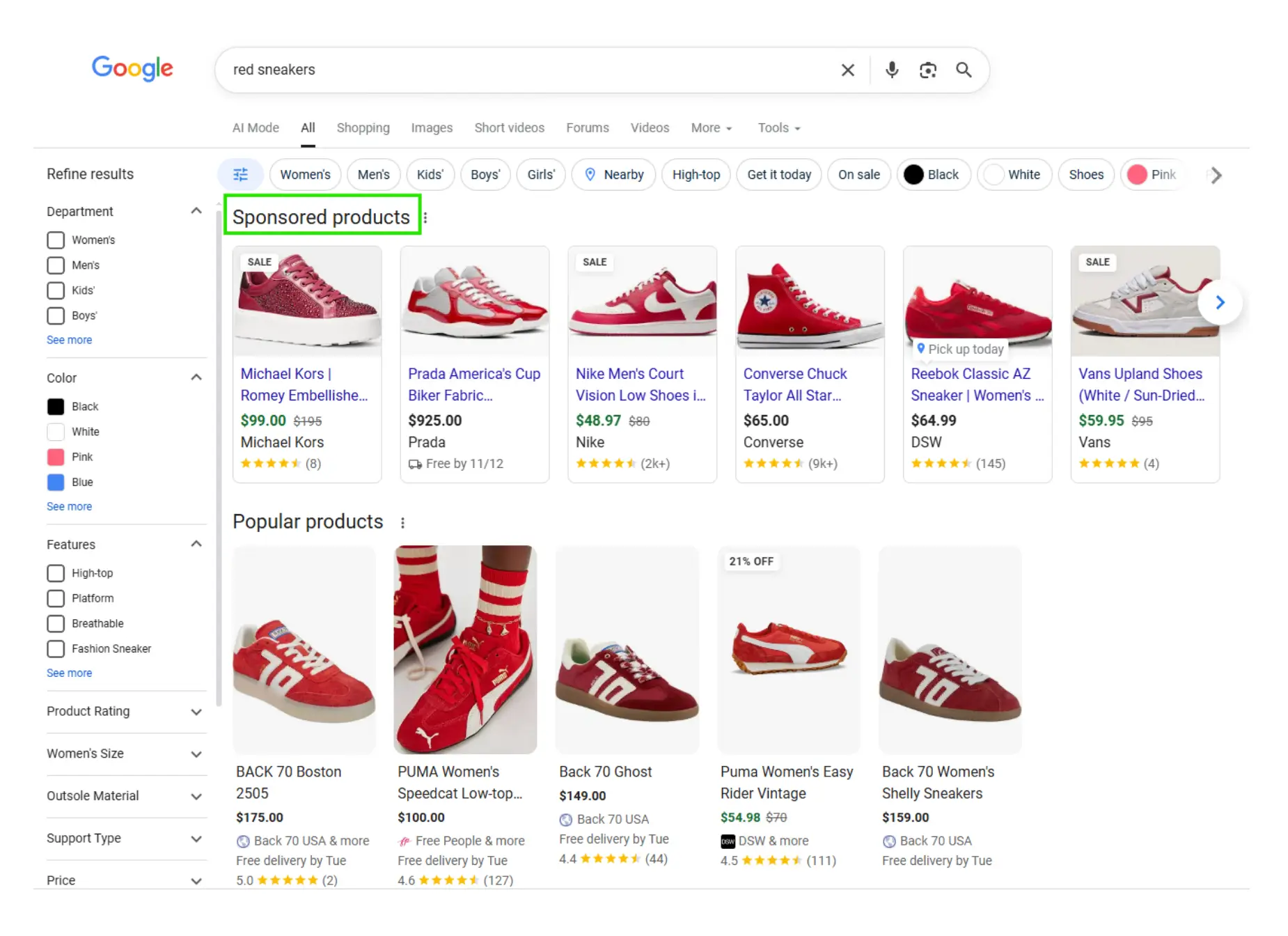
Shopping ads, sometimes referred to as Product Listing Ads (PLAs), are paid advertisements that display product images, prices, and business names directly in search results or on e-commerce platforms like Google Shopping, Amazon, or even Facebook. Unlike traditional search ads that show text-based results, shopping ads provide visual content, making them more eye-catching and engaging for potential customers.
These ads allow retailers to showcase their products directly to shoppers who are actively looking for items to buy. For example, if someone searches for "red sneakers," they will see a selection of red sneakers from various brands, complete with images, prices, and product details, helping them make quicker purchase decisions.
Why Shopping Ads Matter for Your Business ?
Shopping ads are one of the most effective ways to promote your products online. Here’s why:
Why Shopping Ads Matter:
1. Increase Your Visibility
Shopping ads often appear at the top of search results, above organic listings and text ads. The combination of images and product details helps your listings grab attention and attract clicks.
2. Target High-Intent Shoppers
Unlike generic ads, shopping ads reach users who are actively searching to buy. By showing your products to people already in the purchase mindset, you maximize the chances of conversion.
3. Boost Conversion Rates
Providing product images, prices, and descriptions upfront gives shoppers the information they need to make a decision. This transparency reduces hesitation and increases the likelihood of a sale.
Platforms like Google Ads let you track clicks, traffic, and conversions from shopping ads. This data allows you to optimize campaigns for better results and higher ROI.
How Shopping Ads Work?
Shopping ads are typically set up through platforms like Google Merchant Center and Google Ads. Here’s a step-by-step guide on how they work:
Create a Product Feed: The first step in creating shopping ads is setting up a product feed. This is a file that contains all the information about your products, including product titles, descriptions, prices, images, and availability. The product feed is uploaded to platforms like Google Merchant Center, which is linked to your advertising account.
Set Up a Shopping Campaign: After your product feed is ready, you can create a shopping campaign in Google Ads or another platform. Here, you’ll set your bidding strategy, budget, and targeting preferences, like location, device type, and time of day.
Optimization: For your shopping ads to be effective, it’s crucial to optimize your product feed. Ensure that your product titles are descriptive, use high-quality images, and add any relevant keywords to product descriptions. Additionally, monitor your shopping campaigns regularly to adjust bids and targeting based on performance.
Analyze and Optimize Performance: Once your shopping ads are live, you’ll be able to monitor their performance through the reporting tools available on the ad platform. Use these insights to optimize your campaigns and improve your return on investment (ROI).
Best Practices for Shopping Ads
Best Practice | Description |
|---|---|
Use High-Quality Images | Clear, professional visuals grab attention and build trust. |
Optimize Titles and Descriptions | Include relevant keywords and highlight key product benefits. |
Keep Prices Accurate | Shoppers expect consistency, price mismatches can hurt credibility. |
Segment Your Feed | Group products by category, price, or performance to manage campaigns effectively. |
Respond to Trends | Update your feed for promotions, seasonal changes, or new product launches. |
What Should I Do if My Shopping Ads Aren’t Getting Clicks & Conversions?
If your shopping ads aren’t working the way you want, start by checking your product feed. See if any information is missing or incorrect, and fix any errors you find. Look at how your bids are set; try raising bids for products that perform well.
Review your product titles and descriptions too. Use strong keywords that match what people are searching for, and make sure your content clearly describes your products.
Next, check your landing pages. They should be easy to use, load quickly, and match what shoppers are looking for. Try adding more products to your feed, test new promo messages, and keep your prices competitive so buyers are more likely to click and purchase.
How AI is Enhancing Shopping Ads?
Artificial intelligence is transforming how businesses run shopping ad campaigns. AI can help automate key elements, such as:
Product Feed Optimization: AI tools can automatically optimize your product feed by adjusting titles, descriptions, and images based on real-time performance data.
Bid Management: AI can help adjust bids dynamically based on factors like customer behavior, time of day, or competitor pricing.
Ad Personalization: AI enables hyper-targeted ads by analyzing user behavior, demographics, and past purchases, ensuring that shoppers see the most relevant products.
Final Thoughts
Shopping ads are a must-have for any e-commerce business looking to stand out in today’s competitive landscape. With their ability to increase visibility, target the right audience, and drive conversions, shopping ads can provide significant returns on your ad spend. By following best practices and leveraging advanced AI tools, you can create highly effective shopping ad campaigns that maximize sales and grow your business.
Frequently Asked Questions (FAQs)
Can Shopping Ads work for new products or low-traffic stores?

Absolutely. Even new products can get visibility if your product feed is accurate, your images are clear, and your pricing is competitive. Consider using Smart Shopping campaigns with automated targeting and bidding to help reach the right audience without heavy manual management.
Does product pricing affect the Shopping Ads ranking?
Yes. Pricing is a major ranking factor. If your price is significantly higher than market average, Google reduces impressions and prefers cheaper competitor products. Competitive pricing increases visibility and click-through rate.
How do search engines rank websites?
This usually happens when Google cannot understand or verify your product data. Common reasons include missing GTIN/MPN, disapproved images, pricing mismatches, or weak product titles. Another major reason is low product competitiveness — if your price is too high compared to the market, Google reduces impressions. Fixing feed quality usually brings ads back within 24–48 hours.
Do product reviews impact Shopping Ad performance?
Yes. Products with multiple reviews and a 4+ rating consistently get more clicks and conversions. Google also prefers showing highly rated products first because they offer a better buyer experience. Even a small increase in star rating can boost performance.
What Should I Do If My Shopping Ads Aren’t Converting?
Ensure your product feed is accurate and complete
Optimize product titles and descriptions with relevant keywords
Improve landing page speed and relevance
Adjust bids for top-performing products
Test promotions, seasonal updates, and competitive pricing
What is the difference between Smart Shopping Ads and Standard Shopping Ads?
Below are the major difference between Smart Shopping Ads and Standard Shopping Ads
Standard Shopping Ads: You manually manage bids, targeting, and optimization. Best for advertisers who want full control.
Smart Shopping Ads: Google automates bidding, targeting, and ad placement using AI. Ideal for scaling campaigns quickly and maximizing conversions.
Smart Shopping Ads Leverage machine learning to showcase your products to high-intent buyers across Search, Display, YouTube, and Gmail.
How do I reduce wasted spend on Shopping Ads?
Wasted spend happens when ads show for irrelevant searches. Reduce it by:
Adding negative keywords to filter out unwanted traffic.
Segmenting products by profitability or performance in campaigns.
Adjusting bids for high-performing vs low-performing items.
Regularly auditing your product feed to ensure accuracy.
This helps maximize ROI while keeping your ads efficient.



4.9/5 Ratings!

Share this article