
What Are Headings in SEO: Types & Their Benefits?
H1, H2, H3 Headings
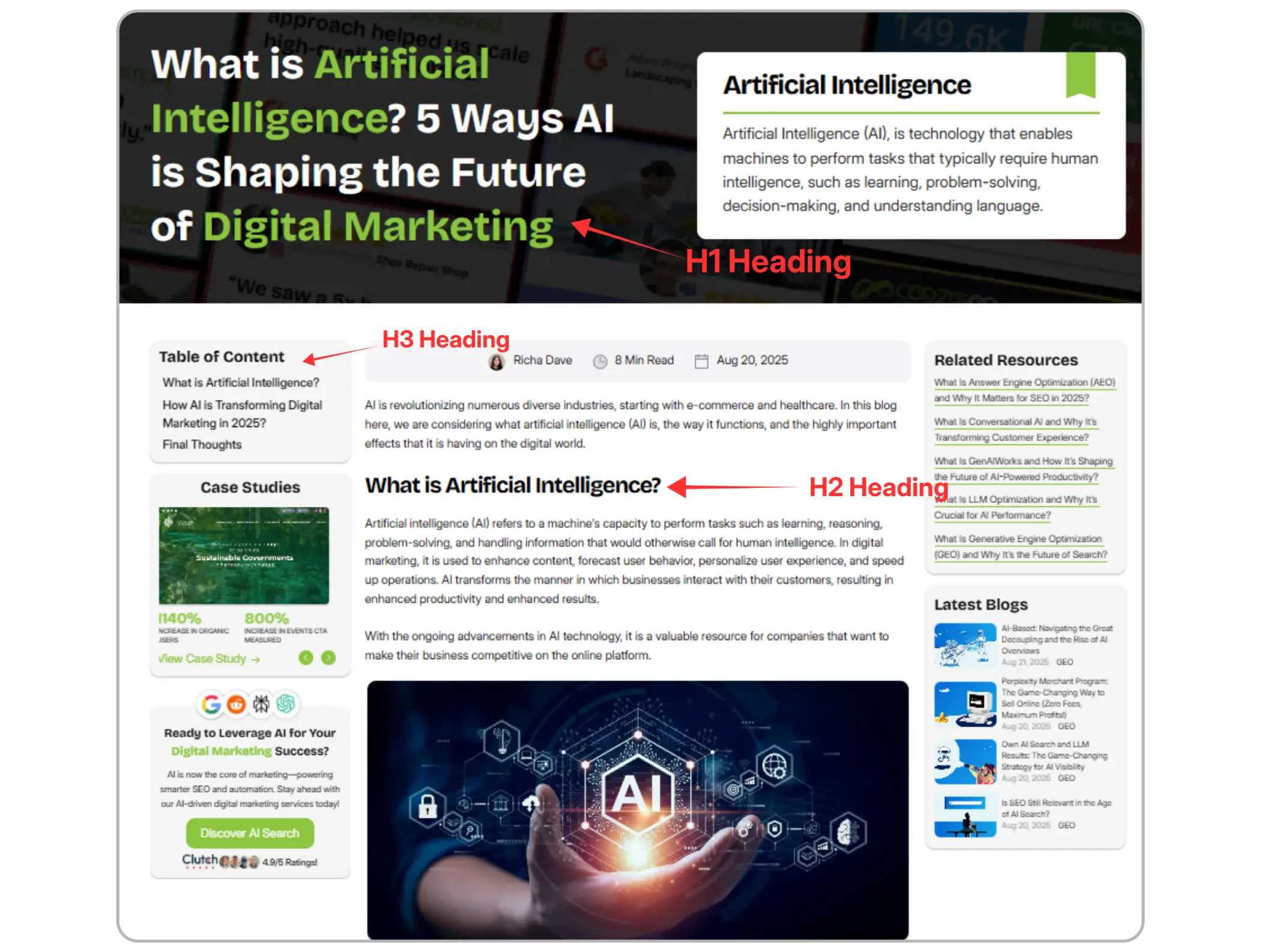
Headings H1, H2 and H3 are the HTML heading tags that define the order and importance of content on webpage. It helps both readers and crawlers, to easily understand and navigate.



What are HTML Headings?
HTML (Hypertext Markup Language) headings are tags you use to set up text on your website. They show people what is important and what is not. This is like how a book uses chapters and sections. You use the H1 tag for the biggest text that matters most. You use the H6 tag for text that is not as big or important.
For most web pages and blog posts, you will use the first three the most.
H1: The one big title at the top of your page. It gives the main idea of what the page is about.
H2: Large headings that split your text into important sections. They help people see what each part is about.
H3: Smaller headings that break down the topics inside each H2 section.
Your H1 works as the main headline. The H2s are like names of chapters. The H3s are small headings inside each chapter. Think of it as a way to help people read and find stuff quickly.
Try HTML Headings: H1 to H6
Edit the HTML below, then select Run to update the preview. H1 identifies the page’s main topic. H2 introduces a main section; H3 introduces a subsection within it. H4, H5, and H6 add progressively deeper levels within the preceding section. Choose levels for meaning, not text size, and avoid skipping levels when opening subsections. You do not need to use all six levels on every page.
The Dual Power of Headings: Why They Matter?
Headings that are used in the right way help people read your site better. They also help search engines understand your pages. This makes the user experience good. It also helps with SEO.
For Your Readers (User Experience)
Many people read things on the internet by quickly looking over text. They try to find things that will answer their questions. Headings help with this. They make it fast and easy for people to get what they need.
Improved Readability: Headings split big text into smaller parts, so the words are easier for people to read.
Clear Navigation: They help people go through your article fast and pick the spot they want to read.
Better Use for All: Screen readers read out headings to help people with low vision find their way around the page, making your site simple for them to use.

For Search Engines (SEO)
Search engines use HTML headings to see the structure and main topics of the page. This helps them know what your page is about.
Context and Relevance: When you put keywords in the titles, it shows what the page is about.
Content Order: A clear order like H1, then H2, then H3 shows which parts matter more. It also lets people see how ideas fit together. When you do this, your page can be shown higher.
Featured Snippets: If your titles and sections are clear, your content can be picked for Google’s top answer boxes.
How to Use H1, H2, and H3 Headings Correctly?
This is the Main Heading
This is a Subheading
This is a Smaller Subheading
This is a Sub-Subheading
This is a Minor Subheading
This is the Smallest Heading
The H1 Tag: Your Main Title
Your H1 is the most important heading.
Use just one H1 on each page. If you add more than one, search engines get confused.
Make the H1 clear and make it interesting so people want to read more.
Put your main keyword in the H1. This shows what the page is about.
H2 Tags: Main Subheadings
Use H2 tags for sections that help the main H1 topic.
Split clear ideas into H2 headings. Make sure each heading talks about a main point.
Keep the same format for all of the text so the article stays neat.
H3 Tags: Supporting Your Subheadings
H3 tags give extra detail to an H2 section.
Use them to help sort examples, lists, or steps for each H2.
Keep the headings in order. Do not jump from H1 to H3. A clear flow is good for both users and search engines.
Final Thoughts
Headings are not just text styles. They help people read your pages better and help your site with SEO, too. A good H1 tells what the page is about. You should use strong H2s for each big part, and H3s are good for smaller points. This makes the text easy to read and helps people know what comes next. It also shows search engines what your content is about. Just like using negative keywords in ads helps filter out irrelevant searches, using the right headings helps search engines and users find exactly what they’re looking for. Proper heading use can make your content stronger and help it rank higher in search results.
Frequently Asked Questions (FAQs)
How many H1 tags should a page contain?

Each page should ideally have only one H1 tag. Multiple H1s can confuse search engines about the page’s primary topic, potentially harming SEO rankings. The H1 should clearly represent the page’s main subject.
How do headings improve SEO rankings?
Search engines use headings to determine the content structure and topic relevance. Including keywords naturally in H1, H2, and H3 helps Google understand your page better. Properly structured headings also improve featured snippet eligibility and help search engines display content accurately in search results.
Can keywords in headings impact SEO?
Yes, strategically placing primary keywords in H1 and related keywords in H2/H3 improves SEO. However, overusing keywords (keyword stuffing) can lead to penalties. Headings should remain natural and readable for humans first.
Are there risks of using too many headings?
Excessive or unnecessary headings can make content look cluttered, confuse users, and dilute SEO signals. Only use headings when they add meaningful structure or improve readability. Avoid decorative headings without context.
Can headings support internal linking strategies?
Yes. Headings can guide readers to related content via anchor links. For example, an H2 “Healthy Snack Ideas” could link to a separate page with detailed recipes, improving navigation and SEO.
What are HTML headings, and why are they critical for websites?
HTML headings (H1–H6) are tags used to define the hierarchy of content on a webpage. They guide readers by showing the structure of the content and help search engines understand the main topics, improving both user experience (UX) and search engine optimization (SEO). Proper heading structure also supports accessibility tools like screen readers.
What is the primary difference between H1, H2, and H3 tags?
H1 represents the main title or focus of the page. H2 tags are subheadings for major sections of content under H1, while H3 tags further divide H2 sections into smaller subsections. This hierarchy ensures a logical flow, which benefits both readers and search engines.



4.9/5 Ratings!

Share this article