
What is Anchor Text & How to Use it Right?
Anchor Text
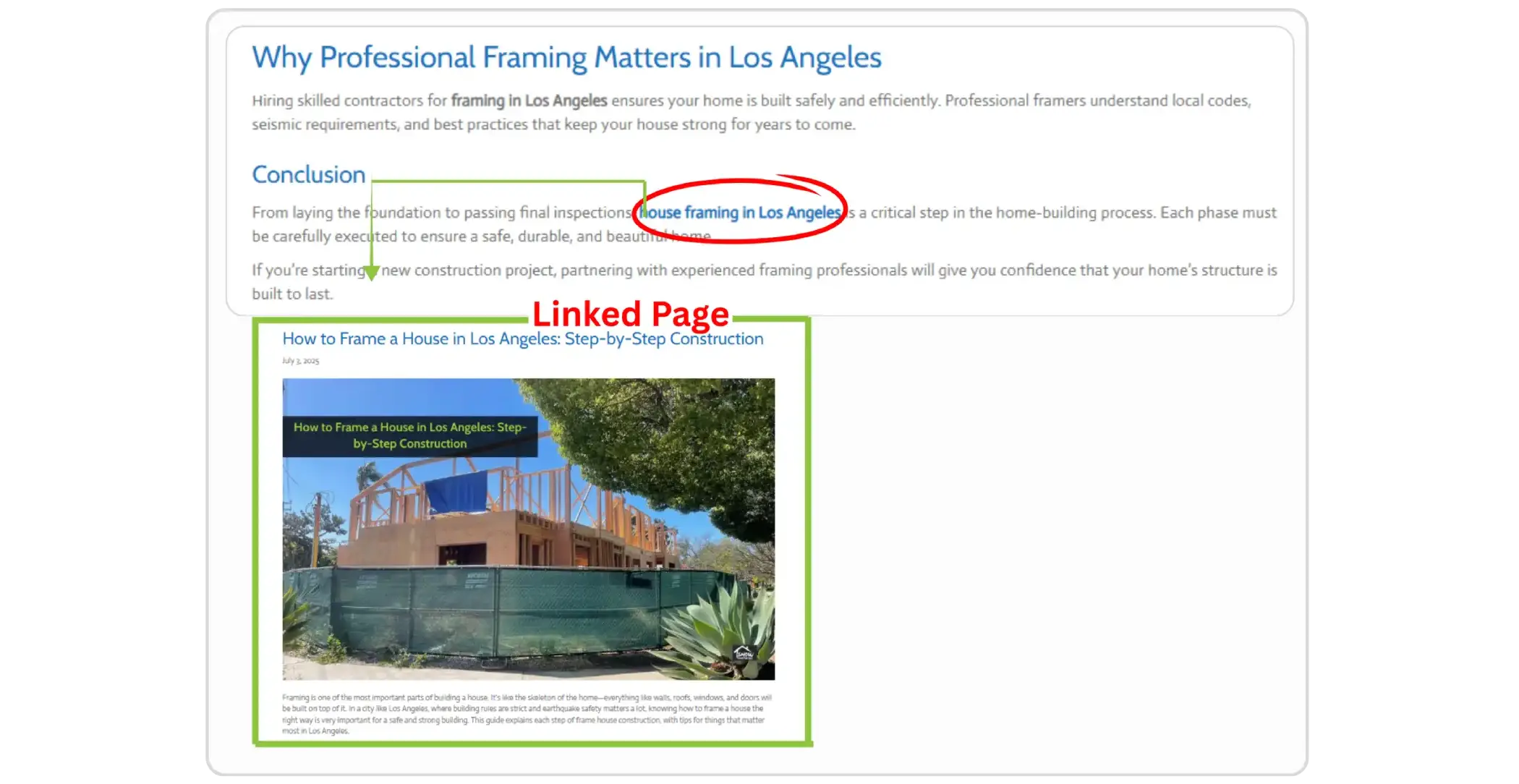
Anchor text is the clickable, visible text in a hyperlink that usually appears in a different color or underlined, guiding users to another page when clicked. When optimized with the right keywords, anchor text can positively influence search rankings and visibility.



What is Anchor Text and Why it’s Important?
Directly seen and clicked upon, anchor text directs the human user as well as the search engine to another page. To set it apart as a link, it is usually styled differently from the surrounding text, perhaps in bold, with color, or with underlining. HTML uses this term to point to the text between <a href="..."> and </a>.
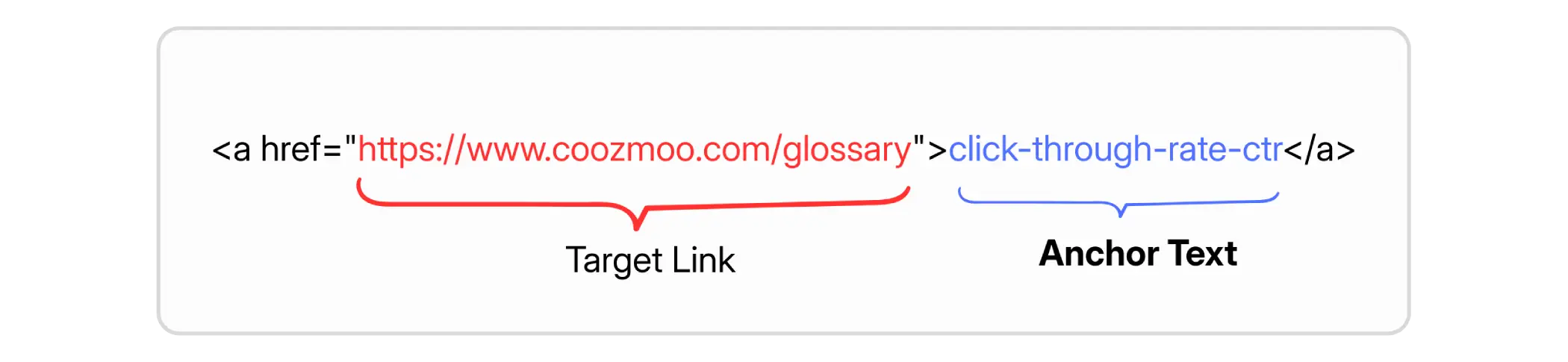
Anchor text gives two directions:
User experience (UX): Provides users with a clear expectation of the content before they click the link.
SEO / search engine understanding: It helps crawlers to understand what the targeted page is about.
Why is Anchor Text Important?
Anchor text is important due to the role that it plays both in helping users navigate and in SEO ranking cues:
User clarity: When you use descriptive anchor text, people are more likely to click because they understand what they'll receive. For instance, "advantages of natural ingredients in soap" is significant compared to "click here."
Internal linking structure: Anchor text helps to tie your website pages together and thematically structure the site.
3. Potential risks: Exact-match keywords might look unnatural and cunning, leading to disadvantage.
Types of Anchor Text
Using a mix helps avoid looking spammy or too optimized. Here are the main types, with definitions:
Type | Description |
|---|---|
Exact match | The Exact match is when the anchor text and the target keyword or keywords on the target page are identical. For example, using “luxury lash extensions” as the anchor text and linking this keyword to a page which tells about the lash extension services. |
Partial match | Only one portion of the target keyword appears in the anchor text. For example, “lash extension tips.” |
Related keyword | Uses keywords related to the target Keyword, rather than the target keyword itself. |
Branded | Label the request anchor text with a brand or company name (“Nike,” “Apple”). This is very frequent for homepages or in a brand reputation context. |
Naked link (URL) | The URL itself is used as anchor text. E.g., www.example.com/anchortext |
Generic | Non-descriptive text such as “click here,” “learn more,” “read more.” |
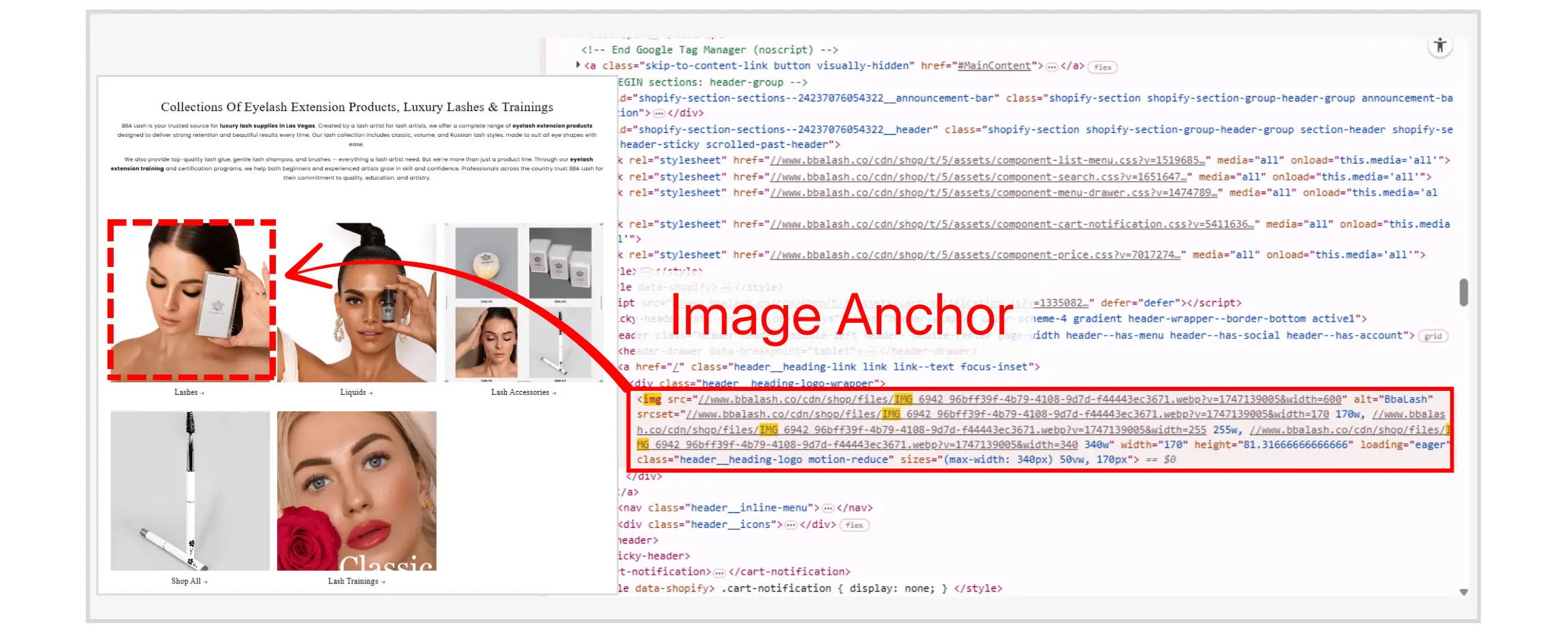
Image anchor | When an image is clickable; the alt text of the image serves as anchor text for SEO and for accessibility. |
Page/article title | Using the title of the target page/article as the anchor text. It’s newsy and easy. |
Compound | Anchor text that mixes brand + keywords or brand phrase + context words. e.g. “SE Ranking’s backlink tool” or “Google’s guidelines for anchor text.” |
Best Practices for Anchor Text
To make the most of anchor text and avoid potential pitfalls, follow these guidelines:
Be descriptive & relevant: Use anchor text that tells both users and search engines what the linked-to page is about. Avoid vague link text unless the surrounding context makes it clear.
Keep it concise: Short phrases (a few words) are better than long ones. They’re easier to read and work better in context.
Use a variety of anchor text types: Avoid overusing exact match keywords. Instead, mix in branded, partial match, related keywords, and generic terms to create a more natural and diverse link profile.
Avoid over-optimization: If too many incoming links or internal links are overusing the exact-match anchor, it looks manipulative sometimes. Google has their algorithm and manual actions which will penalize such pattern.
Use proper alt text for image links: Since images used as links don’t possess visible text, the alt attribute needs to act as the anchor text. It must remain descriptive, concise, and relevant.
Ensure the links are really easy to see: Users should instinctively recognize links due to color, underlining, or sizing for hovers. Low visibility diminishes usability.
Check and review your anchor text profile: Use SEO tools to identify which anchor texts are directing to your site (backlinks) and what internal links you're using. Look for patterns of overuse or generic anchors that can be improved.
Final Thoughts
Anchor text may look like a minor element, but it has a significant impact on user experience and SEO. When done right, it makes your content read smoothly, enhances navigation, highlights the topics of your pages, and provides search engines with helpful signals that boost your page rankings. When done poorly, with too many generic phrases, repetitive exact-match anchors, or misleading link text — it can hurt credibility, confuse users, or even trigger an algorithmic audit.
So, whether you’re building internal links, writing blog posts, or reaching out for backlinks, give some attention to your anchor text.
Frequently Asked Questions (FAQs)
What is the difference between anchor text and a regular hyperlink?

While a hyperlink simply connects one page to another, anchor text is the visible, clickable text of the link. It gives context to both users and search engines about what the linked page is about, improving clarity and SEO relevance.
How does anchor text affect SEO?
Anchor text helps search engines understand the topic of the page you are linking to. Well-crafted anchor text can improve your page rankings for relevant keywords, enhance internal linking structure, and provide context for external backlinks.
Should I always use exact-match keywords as anchor text?
No. Using exact-match keywords too frequently can appear manipulative and trigger algorithmic penalties. Instead, mix branded, partial-match, related, generic, and descriptive anchors to maintain a natural link profile.
Can images have anchor text?
Yes. When an image is clickable, the alt text of the image acts as anchor text. This ensures both search engines and screen readers understand the purpose of the link, supporting SEO and accessibility.
How long should anchor text be?
Keep it concise but descriptive, usually a few words or a short phrase. Long anchor text can be confusing and may reduce click-through rates, while very short anchors like “click here” don’t provide search engines or users with context.
How do I optimize internal linking with anchor text?
Use descriptive and relevant anchors to connect pages logically. Mix anchor types, avoid overusing exact-match keywords, and ensure links are easily visible. This improves site navigation, user experience, and SEO performance.
Can anchor text influence user behavior?
Absolutely. Clear and descriptive anchor text guides users, sets expectations for the linked page, and can increase click-through rates. Misleading or vague anchor text may frustrate visitors and reduce engagement.



4.9/5 Ratings!

Share this article